 English
 Español
 日本語
日本語 Français
 Deutsch
 Tiếng Việt
 العربية
 Portugues
 lingua italiana
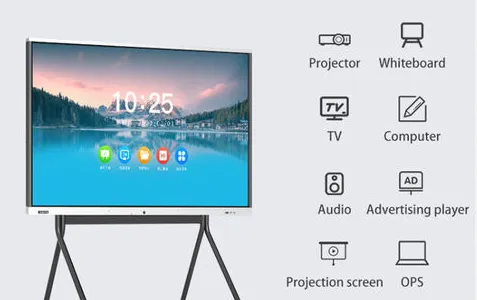
The interactive whiteboard screen functions as an input device for your computer, enabling you to work in any application on the connected computer. You need two additional components to use the interactive whiteboard: a computer and a digital projector. These components work together as follows:
Your computer runs an application and sends the image to the projector.
The projector casts the image onto the interactive whiteboard.
The interactive whiteboard detects contact with its screen and sends each contact point to the connected computer.
If your interactive whiteboard is equipped with a pen tray featuring control and tool selection buttons, you can utilize these buttons to choose various tools. For instance, by pressing the left click button, the interactive whiteboard interprets your finger touch as a mouse click, allowing you to control the computer directly from the whiteboard. When you pick up a pen and press one of the color buttons, digital ink is activated, enabling you to write over the desktop or any open application.

What are Smart Boards Used for?
In general, a smartboard is a great way to engage people of all ages in learning or productive tasks. Classrooms and businesses are the most common places to find smartboards. However, they can also be used in other settings, such as hospitals and museums.
Benefits of Interactive Flat Panels for Schools
Easy to Setup, Manage, and Use
The adoption of Interactive Flat Panels (IFPs) in educational settings offers numerous advantages, particularly in terms of simplicity in setup, management, and utilization. These devices are intentionally designed to be user friendly, ensuring straightforward installation and configuration within the school environment. IFPs eliminate the need for extensive wiring or complex furniture arrangements, as they can be easily mounted directly on walls using just a few wires and screws. This streamlined installation process further obviates the requirement for specific infrastructure, making IFPs accessible even in remote regions where resource limitations may pose challenges.
User Friendly Interface
A significant advantage of incorporating Interactive Flat Panels (IFP) in educational settings lies in their user friendly interface. The intuitive design and recognizable functions ensure ease of navigation and utilization for both teachers and students during regular classroom sessions. Moreover, the fact that teachers are already familiar with using televisions at home enhances their comfort level with IFPs. This sense of familiarity facilitates the swift adoption and integration of the technology into the classroom, ultimately leading to a more seamless teaching and learning experience.
What Makes an Interactive Flat Panel a Great Choice
Interactive smart screen whiteboard is an easy to use, new age smart classroom solution to empower 21st century schools and teachers by combining the best digital content and resources, all in one place. Further, with its integrated reporting and monitoring dashboard, teachers can easily track student progress and gain valuable insights to enhance their teaching strategies.
A Bilingual and Comprehensive Approach
Offering a comprehensive array of rich digital content tailored for classes 1st to 12th, covering all subjects, a diverse range of materials. This multicategory content includes animated lessons and practice modules that provide instant feedback, practical demonstrations, syllabus books, detailed notes, and assessments. Accessible in English, Hindi, and local languages, the combination of interactive and inclusive features, coupled with touch screen classroom board technology, is an ideal solution for elevating the teaching learning experience and fostering improved classroom interactions.
Improving Classroom Efficiency and Ease
In the context of smart class solutions, the convenience of having all essential resources consolidated in one platform proves indispensable. This not only saves time but also eliminates the need for toggling between apps, connecting to the internet, and prevents potential distractions in the classroom. Centered around an interactive flat panel, stands out as a distinctive solution for schools. Its integrated bilingual and user friendly learning platform empowers teachers to seamlessly transition between classes, accessing both online and offline content with ease.
Efficient Tracking of Teaching Content
For educators, manually managing and tracking teaching content can be a challenging endeavor.
It is indeed an exciting time to be in education as these innovative tools continue to enhance teaching and learning experiences, opening up endless possibilities for knowledge acquisition and academic growth.
What Types of Smart Boards are Available?
There are three main types of smart screen whiteboard available on the market:
Interactive whiteboards: These boards are designed for use in classrooms and businesses. They allow users to interact with digital content, such as PowerPoint presentations or video files.
Portable whiteboards: These boards are smaller and easily moved from one location to another. They are often used in hospitals and museums.
Interactive projectors: This type of device can be used with any projector screen. They allow users to interact with digital content, such as PowerPoint presentations or video files.
What Technology do Smart Boards Use?
The smart board establishes a connection with a PC via an HDMI connection. It mirrors the computer's display on the SMART Board, allowing users to view and interact with the content simultaneously.
The capability to collaboratively work on a task on a smart board has been present in more advanced versions for some time.
Smart boards employ two primary display technologies: LCD displays and projectors. Users can choose between these options based on their preferences and requirements.
LCD smart boards generally come with a higher price tag compared to their projector counterparts, but they offer distinct advantages. One notable advantage is that LCDs don't necessitate a darkened room to function optimally, making them well suited for classrooms and offices with ample natural light.
Moreover, LCD smart boards typically boast a higher resolution than their projector based counterparts, enhancing their suitability for displaying high quality images and videos.
On the other hand, projector based smart boards are more budget friendly compared to LCD models but come with some trade offs. They require a darkened environment to operate effectively, which can be inconvenient in busy workplaces or classrooms.
Utilizing our pre engineered reference designs as a baseline, EKAA can easily customize as much or as little as needed to get the look and feel of a custom product,such as 75 inch smart board, with the performance and reliability of OEM engineering and manufacturing.