
 English
 Español
 日本語
日本語 Français
 Deutsch
 Tiếng Việt
 العربية
 Portugues
 lingua italiana
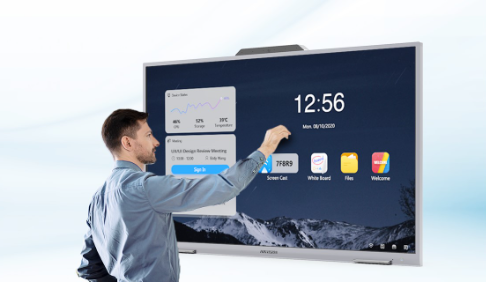
Interactive Flat Panels For Schools: Enhancing Teaching and Learning
In the realm of educational technology, a transformative phase commenced with the introduction of interactive whiteboards. Previously, technology was mainly relegated to IT sectors and laboratories. However, the advent of interactive whiteboards ushered in a new era of sophisticated learning. Teachers found themselves able to connect with their students on a profound level, encouraging dynamic interactions and fostering a more profound comprehension of subjects and topics. This approach also unlocked access to a plethora of digital resources that seamlessly complemented the curriculum, enhancing the overall educational experience for everyone involved.
Introduction of Interactive Flat Panel Display
An Interactive Flat Panel Display (IFPD) is a large, touch sensitive display screen that allows users to interact with the content displayed on it. It combines the functions of a traditional interactive whiteboard with the visual clarity of a high definition display. These devices are commonly used in educational and business settings for presentations, collaboration, and interactive learning.
Key Features of An Interactive Flat Panel Display Include:
Touch Sensitivity: IFPDs are equipped with touch sensitive technology, allowing users to interact with the display using their fingers or a stylus. This enables drawing, writing, and manipulation of on screen content.
High Resolution Display: IFPDs typically have high definition (HD) or ultra high definition (UHD) displays, providing clear and crisp visuals for presentations, videos, and other content.
Built in Software: Many IFPDs come with built in software that enhances collaboration and interactivity. This software often includes tools for annotation, drawing, and screen sharing.
Connectivity: Interactive Flat Panel Displays usually offer a variety of connectivity options, such as HDMI, USB, and wireless connections, allowing users to connect various devices like computers, tablets, and smartphones.
Multi User Support: IFPDs often support multiple users simultaneously, enabling collaborative work or interactive group activities.
Versatility: They can be used for a wide range of applications, including presentations, interactive lessons, video conferencing, and collaborative brainstorming sessions.
Durability: These displays are designed to be durable and withstand regular use in educational and business environments. They may have features like scratch resistant screens and sturdy frames.
The all in one digital touch screen board combine a range of collaboration and meeting management functions into one large, flat panel display. Users can connect to interactive flat panel displays from their own devices, or they can use multitouch capabilities on the display itself.

Applications of Interactive Flat Panels
Due to their specialized focus on collaboration, interactive flat panel displays are commonly employed in two distinct settings. Interactive Flat Panels (IFPs) in schools enable the use of interactive content, fostering real time practice with immediate feedback. In schools, these panels facilitate collaborative learning experiences, allowing students to collaborate on projects, share ideas, and enhance their understanding.
Educational Environments
In contrast to traditional whiteboards and digital projectors that often result in passive viewing and limited engagement, interactive flat panel displays tailored for educational use empower educators to establish contemporary, data driven classrooms that foster enhanced collaboration and learning.
The latest software accompanying smart interactive panel includes analytics tools, enabling educators to monitor attendance, assess student engagement, and gain a comprehensive understanding of the classroom dynamics. Additionally, teachers can capture classroom content for later sharing.
By seamlessly integrating with educational software and learning platforms, it enables teachers to conduct captivating classroom sessions that capture the attention of students. Its intuitive interface and interactive features support hands on learning, allowing students to directly engage with animated lessons and participate in real time collaboration through practice questions. The interactive flat panel cultivates an environment where students actively participate, explore, and absorb knowledge.
Role of Interactive Flat Panels for Schools
Active Learning and student centered approach in Classrooms
Interactive Flat Panels designed for schools possess the capability to redirect students' attention and promote a sense of community. Operating as a central hub, these displays facilitate collaboration, sharing, and the exchange of ideas among students. Moreover, the implementation of a smart class teaching approach nurtures a cohesive environment within the classroom, allowing students to actively participate in discussions, presentations, and the sharing of knowledge collectively.
Instruction with Ease and differentiated learning
With IFPs, educators can seamlessly conduct lessons through intuitive touch screen technology and access a diverse range of content across multiple categories. The need for a mouse, pointing device, or remote for navigation is eliminated, as the digital displays on IFPs in classrooms are user friendly and come with a pre installed learning platform designed for touch interaction. Moreover, the interactive capabilities of IFPs spark curiosity, leading to increased engagement and collaboration among students. A prominent example of this is evident in practice sessions within classrooms.
Complementing teaching and learning with easy access to comprehensive resources
Interactive Flat Panels empower teachers to leverage an extensive array of multi category content, spanning animated video lessons, a digital book library, and interactive lessons featuring textbooks. With IFPs, educators can enhance their teaching methodologies by incorporating dynamic content sourced from compatible learning platforms or applications, thereby facilitating easy access to comprehensive resources that complement the teaching and learning experience.
Lesson Plan Flexibility
Interactive touch screen smart board provide teachers with a wealth of possibilities compared to more conventional options. They serve as versatile tools for sharing and presenting content, emphasizing crucial information, involving students in group activities, and more. Teachers can utilize these displays for leading Q&A sessions, delivering instructions using diagrams and videos, and conducting educational game sessions.
As IFPs advance, their impact in the classroom is amplified by the widespread growth of apps, online educational content, and digital curriculum. This synergy effectively bridges the gap between educational content and the learning environment, proving especially valuable during periods of remote and hybrid learning. IFPs, such as those from Newline Interactive, bring digital curriculum to life through interactive content, videos, games, and more.
This flexibility accommodates various learning styles, catering to auditory, visual, and kinetic learners who can watch, listen, and follow along on their synced devices in real time.
Utilizing our pre engineered reference designs as a baseline, EKAA can easily customize as much or as little as needed to get the look and feel of a custom product with the performance and reliability of OEM engineering and manufacturing.