
 English
 Español
 日本語
日本語 Français
 Deutsch
 Tiếng Việt
 العربية
 Portugues
 lingua italiana
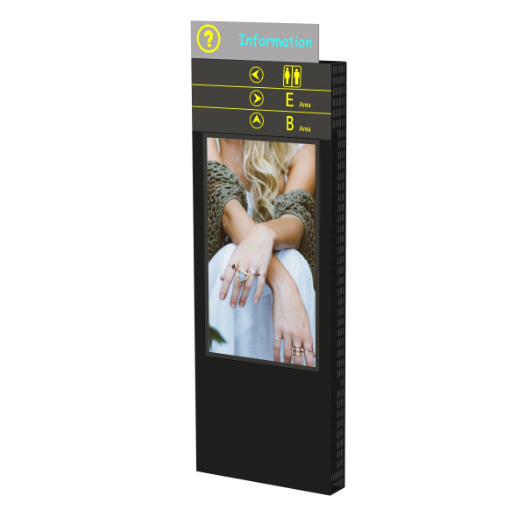
A wayfinding outdoor kiosk is a self-service interactive device typically placed in outdoor environments, such as public spaces, shopping centers, campuses, or transportation hubs. It serves as a navigation and information tool to help users find their way and access relevant information about the surrounding area.
The primary purpose of a wayfinding outdoor kiosk is to provide interactive maps, directions, and other relevant information to assist users in navigating through a particular location. It may offer features such as search functionality, points of interest, directories, and routing options. Users can interact with the kiosk by touching the screen or using other input methods to select their desired destination or query for specific information.
These kiosks are designed to withstand outdoor conditions, including exposure to various weather elements like rain, sunlight, and temperature fluctuations. They are often equipped with robust and durable hardware, including weatherproof enclosures, high-brightness displays for visibility in sunlight, and secure touchscreens to facilitate user interaction.
Wayfinding outdoor kiosks can be valuable in enhancing visitor experiences, reducing the need for physical signage, improving navigation efficiency, and promoting engagement within a particular area. They are commonly used in urban environments, tourist destinations, large facilities, and other outdoor spaces where wayfinding and information dissemination are essential.


ip67 Outdoor 4000nits displays Wayfinding Outdoor IP67 4000nits Kiosk Wayfinding Outdoor Kiosk
How does a wayfinding outdoor kiosk work?
A wayfinding outdoor kiosk typically operates using a combination of hardware and software components to provide interactive navigation and information services. Here's a general overview of how a wayfinding outdoor kiosk works:
Hardware Setup: The outdoor kiosk consists of a rugged enclosure designed to withstand outdoor conditions. It houses a high-brightness display, a touch-sensitive screen, and other necessary components like a computer or media player, speakers, and input/output devices.
Software Interface: The kiosk runs specialized wayfinding software that provides the user interface for interaction. The software can be custom-developed or provided by a third-party vendor. The interface is designed to be intuitive, user-friendly, and visually appealing, allowing users to easily navigate and access information.
Map and Location Data: The kiosk is loaded with relevant map and location data, including detailed maps of the area, points of interest, routes, and other relevant information. This data can be obtained from various sources, such as GIS databases, mapping services, or custom content creation.
User Interaction: Users approach the wayfinding outdoor kiosk and interact with the touch-sensitive screen or other input methods provided. The software interface allows users to search for specific destinations, view maps, select points of interest, and request directions.
Information Display: The kiosk displays relevant information based on user queries and interactions. This can include maps, directions, points of interest details, facility directories, event information, or any other relevant content that assists users in finding their way or accessing desired information.
Routing and Directions: Once a user selects a destination or enters a search query, the wayfinding software calculates the optimal route and provides step-by-step directions. The directions can be displayed on the screen, accompanied by audio prompts or even printed as a physical copy if the kiosk supports it.
Additional Features: Wayfinding outdoor kiosks may offer additional features depending on their capabilities and the specific needs of the location. These could include multilingual support, accessibility options for users with disabilities, emergency information, advertising or promotional content, or integration with other systems like transportation schedules or live data feeds.
The wayfinding outdoor kiosk combines hardware, software, and data to provide users with interactive navigation and information services, enabling them to easily find their way and access relevant information in outdoor environments.
Outdoor kiosks can be customized with branding and design elements to align with the identity and aesthetics of a particular business or location. Customization options allow outdoor kiosks to reflect a consistent visual style and branding message. Here's how outdoor kiosks can be customized:
Branding Elements: Outdoor kiosks can be adorned with branding elements such as logos, colors, and taglines. These elements can be prominently displayed on the kiosk's enclosure, screen interface, or surrounding areas. Branding elements help create a cohesive visual identity and reinforce brand recognition.
Enclosure Design: The physical enclosure of the outdoor kiosk can be customized to match the desired design aesthetic. This includes the shape, size, materials, and finishes of the kiosk. For example, the enclosure may be made of stainless steel, aluminum, or other durable materials, and can be painted or coated to match specific colors or themes.
Display Content: The content displayed on the kiosk's screen can be customized to align with the brand's visual guidelines. This includes selecting appropriate fonts, colors, and graphic styles that are consistent with the brand's identity. Customized content can include logos, backgrounds, icons, and other visual elements.
User Interface Design: The user interface (UI) of the kiosk's software can be customized to reflect the brand's look and feel. This involves designing the layout, color scheme, icons, and buttons in a way that aligns with the brand's visual identity. A well-designed UI ensures a cohesive experience for users interacting with the kiosk.
Wraps and Decals: Outdoor kiosks can be wrapped with vinyl graphics or decals that feature branding elements. Wraps provide a flexible and cost-effective way to customize the appearance of the kiosk while protecting it from environmental factors. The graphics can include logos, images, text, or any other visual elements desired.
Signage and Displays: In addition to the kiosk itself, signage and displays can be placed around the kiosk area to further enhance branding and provide additional information. These can include digital signage, posters, or other forms of visual communication that complement the outdoor kiosk's design.
EKAA Technology was established in 2012. As a ISO9001 certified manufacturer, we had become a world-class and reliable ODM/OEM partners in the market. We are equipped with the most advanced automatic machines and well-equipped devices for Outdoor & Indoor LCD Display production, which can support our monthly production capability.


